Google 公司开发的 Gemini 2.5 模型经过训练,能够深入思考复杂问题,从而显著提升推理能力。
Poixe AI 平台提供的 Gemini 系列模型,尚未支持官方协议,而是采用的 Google 提供的 OpenAI 协议的接口,如果需要使用模型的思考功能,请参考本帖。
控制思考模式
参考官方文档:
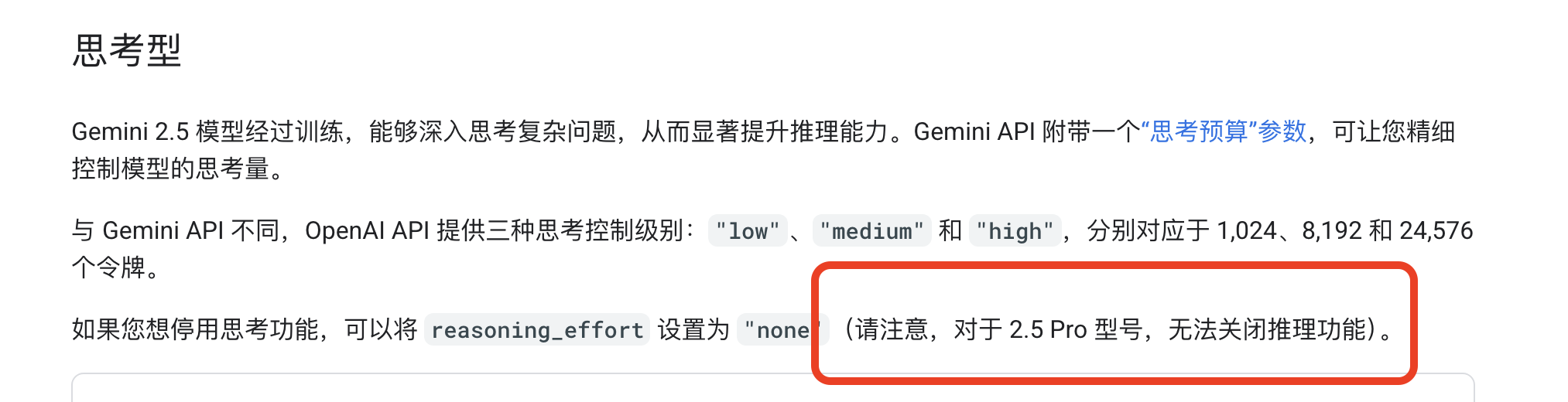
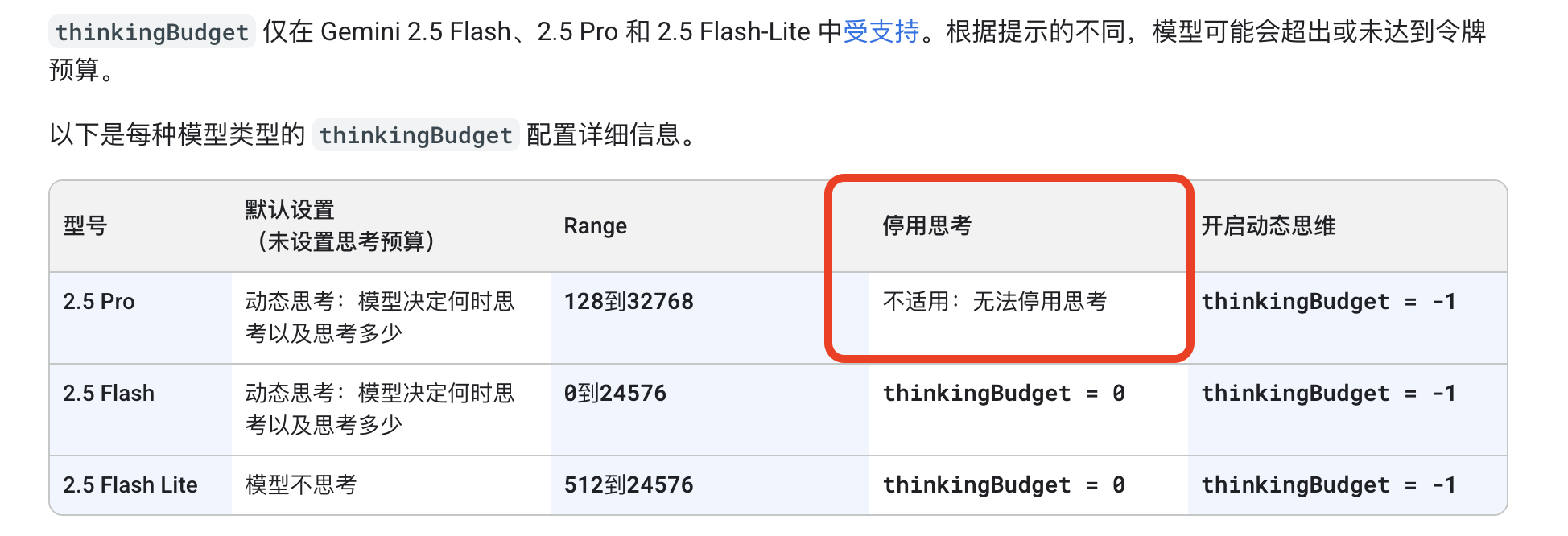
注意:Gemini 2.5 Pro 和 2.5 Flash 默认开启思考功能。对于 2.5 Pro 型号,无法关闭推理功能。
Gemini API 附带一个“思考预算”参数,可让您精细控制模型的思考量。
与 Gemini API 不同,OpenAI API 提供三种思考控制级别:"low"、"medium" 和 "high",分别对应于 1,024、8,192 和 24,576 个令牌。
如果您想停用思考功能,可以将 reasoning_effort 设置为 "none"
Gemini 思考模型还会生成思考摘要,并且可以使用确切的思考预算。 您可以使用 extra_body 字段在请求中添加这些字段。
请注意,reasoning_effort 和 thinking_budget 的功能重叠,因此不能同时使用。
示例代码
这里演示最原始的 Postman 中请求体的写法,如下:
{
  "model": "gemini-2.5-pro-preview-05-06",
  "messages": [
    {
      "role": "user",
      "content": "hi"
    }
  ],
  "extra_body":{
    "google": {
      "thinking_config": {
        "include_thoughts": true
      }
    }
  }
}
响应体:
{
    "choices": [
        {
            "finish_reason": "stop",
            "index": 0,
            "message": {
                "content": "<thought>**Processing a Simple Greeting**\n\nOkay, the user just said \"hi.\" That's a classic conversational opener, a simple greeting. My job is to respond appropriately, initiate a helpful interaction, and quickly understand what the user needs.\n\nFirst, I acknowledge the greeting. \"Hello!\" or \"Hi there!\" are good starting points. But a simple greeting alone isn't enough. I'm here to *help*. So, I need to couple that greeting with an offer of assistance.  \"How can I help you today?\" is a standard, tried-and-true prompt. It's direct, polite, and clearly communicates my purpose. I could also use \"What can I do for you?\" or \"How can I assist you today?\" to add variety.\n\nI considered a few different options: a friendly \"Hi there! What can I do for you today?\", a casual \"Hey! How can I help you?\", and even a more formal \"Hello! How can I assist you today?\". I like the balance of friendly and professional. I could also make it more specific: \"Hi there! How can I help you today? Is there something you'd like to know or create?\" I need to keep in mind, however, the user is starting a simple conversation, so I don't want to overwhelm them.\n\nUltimately, I'm going with a straightforward \"Hello! How can I help you today?\" It's effective, friendly, and instantly signals my willingness to assist. It directly addresses the user's initial input, fits the role of a helpful AI assistant, and gives the user a clear prompt to move the conversation forward. It's a solid, reliable response. That's a good place to begin.\n</thought>Hello! How can I help you today?",
                "extra_content": {
                    "google": {
                        "thought": true
                    }
                },
                "role": "assistant"
            }
        }
    ],
    "created": 1753455745,
    "id": "gZyDaI3cGdL_ugf8tsPYDg",
    "model": "gemini-2.5-pro-preview-05-06",
    "object": "chat.completion",
    "usage": {
        "completion_tokens": 632,
        "prompt_tokens": 2,
        "total_tokens": 634
    }
}
写在最后
如果您有任何的疑惑,请随时联系团队技术支持。
Poixe AI 官网:https://poixe.com